
Best Vertical Mouse for Mac (2026)
Best vertical mouse for Mac (2026): 6 picks tested on macOS compatibility, Bluetooth performance & desk ergonomics. Our top pick may surprise you →
Updated 2026-03-09
30-Second Video: Best Vertical Mouse for Mac
30-second walkthrough for best vertical mouse for mac.
Quick Answer: Best Vertical Mouse for Mac (2026)
Best Vertical Mouse for Mac (2026)
The best vertical mouse for Mac is the Logitech MX Vertical, scoring 91/100 for its native Bluetooth pairing, full Logi Options+ macOS app, and USB-C charging. Budget Mac users should start with the iClever Ergonomic Mouse (~$26) for dongle-free Bluetooth. Left-handed Mac users have one real option: the Logitech Lift Left.
By Matt Sullivan · Last updated March 9, 2026
If you are a Mac user looking for an ergonomic vertical mouse, compatibility is not optional — it is the first filter. Not every vertical mouse plays well with macOS. Some lack Bluetooth entirely and ship only with a USB-A receiver that requires a dongle on modern MacBooks. Others have companion software that is Windows-only, locking you out of button customization and DPI adjustments.
This guide ranks the best vertical mice for Mac using our 100-point scoring methodology, with macOS compatibility weighted into every score. Every mouse listed here works with macOS out of the box — no workarounds, no missing features, no "partial support."
Medical disclaimer: This guide provides general ergonomic information and is not medical advice. If you experience persistent hand, wrist, or arm pain, consult a healthcare professional. OSHA and the Mayo Clinic offer evidence-based guidance on workplace ergonomics.
Why Mac Users Need a Specific Vertical Mouse
Mac compatibility sounds simple but involves several layers:
1. Connectivity. Modern MacBooks and iMacs prioritize Bluetooth. Many budget vertical mice ship with only a 2.4 GHz USB-A nano receiver — usable only with a USB-A to USB-C adapter. True Bluetooth support eliminates the dongle problem entirely.
2. Software support. Mice with programmable buttons typically rely on companion software. If that software is Windows-only, you lose button remapping, DPI adjustments, and gesture controls on your Mac. The best options either have native macOS apps or work fully through macOS system preferences.
3. Scroll behavior. macOS uses "natural scrolling" (reversed from Windows default). Most mice respect this system setting, but some budget models behave inconsistently, particularly with horizontal scrolling or scroll acceleration.
4. Multi-device pairing. Mac users who switch between a MacBook, iPad, and external display benefit from mice that pair with multiple devices simultaneously — a feature common in Logitech's ecosystem but rare in budget vertical mice.
How We Score: 100-Point Methodology
Category Weight What We Measure
Fit 35% Palm contact area, finger reach, grip width, body dimensions relative to hand size
Comfort 25% Weight distribution, surface material, thumb rest, sustained-use fatigue
Control 20% Sensor accuracy, DPI range, macOS software support, scroll behavior
Value 20% Price vs. build quality, warranty, Mac-native features included
For this Mac-specific guide, Control scoring includes macOS software quality and Bluetooth reliability — factors that do not apply in our platform-agnostic guides.
Best Vertical Mice for Mac — Comparison Table
Mouse Score Fit Comfort Control Value Connection macOS App Price Buy
Logitech MX Vertical 91/100 33/35 24/25 18/20 16/20 Bluetooth + USB receiver ✅ Logi Options+ ~$100 Check on Amazon (https://www.amazon.com/s?k=Logitech+MX+Vertical)
Logitech Lift 87/100 30/35 24/25 17/20 16/20 Bluetooth + USB receiver ✅ Logi Options+ ~$70 Check on Amazon (https://www.amazon.com/s?k=Logitech+Lift+Vertical)
Evoluent VerticalMouse 4 83/100 31/35 22/25 15/20 15/20 Wired USB / Bluetooth (BT model) ⚠️ Mac version available ~$90 Check on Amazon (https://www.amazon.com/s?k=Evoluent+VerticalMouse+4)
Anker Ergonomic Vertical 76/100 27/35 20/25 14/20 15/20 2.4 GHz USB-A only ❌ No app ~$23 Check on Amazon (https://www.amazon.com/s?k=Anker+Ergonomic+Vertical+Mouse)
iClever Ergonomic Mouse 74/100 26/35 20/25 13/20 15/20 Bluetooth + 2.4 GHz ❌ No app ~$26 Check on Amazon (https://www.amazon.com/s?k=iClever+Ergonomic+Vertical+Mouse)
Perixx PERIMICE-713 71/100 26/35 19/25 12/20 14/20 2.4 GHz USB-A only ❌ No app ~$30 Check on Amazon (https://www.amazon.com/s?k=Perixx+PERIMICE-713)
Detailed Reviews
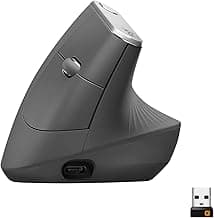
1. Logitech MX Vertical — Best Overall for Mac (91/100)
Fit: 33/35 | Comfort: 24/25 | Control: 18/20 | Value: 16/20
The MX Vertical is the gold standard for Mac-using ergonomic mouse buyers. Logitech's macOS ecosystem is the best in the peripheral industry — Logi Options+ is a fully native Mac app with per-application button mapping, gesture customization, and Logitech Flow for seamless cursor movement between Mac devices.
The 57-degree ergonomic angle is derived from research on forearm pronation reduction. At 12 cm long and 7.8 cm wide, it is one of the largest vertical mice available, making it the best fit for medium-to-large hands.
Why it leads on Mac: Bluetooth pairs instantly with macOS. USB-C charging (no disposable batteries). Logi Options+ integrates with macOS gesture system. Pairs with up to 3 devices — ideal for MacBook + iMac + iPad workflows. Logitech Flow lets you drag files between Macs using one mouse.
Tradeoffs:
✅ Best macOS software integration of any vertical mouse
✅ USB-C charging, 4-month battery life
✅ 4000 DPI sensor — handles Retina displays and multi-monitor setups
✅ Multi-device switching via button on the bottom
⚠️ Premium price — most expensive option on this list
⚠️ Right-hand only (left-handed Mac users: see the Logitech Lift below)
⚠️ Rubberized coating wears over 12–18 months of daily use
Best for: Mac power users who need multi-device support and are willing to invest in the best integration. If you work across a MacBook and an external display, the MX Vertical eliminates friction. Read our full large hands guide (https://verticalmouseguide.com/best-vertical-mouse-large-hands/) for hand-size-specific scoring.
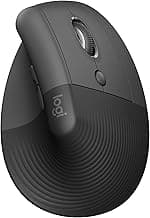
2. Logitech Lift — Best for Small-to-Medium Hands on Mac (87/100)
Fit: 30/35 | Comfort: 24/25 | Control: 17/20 | Value: 16/20
The Lift is Logitech's answer to the MX Vertical's size problem — it is designed for hands under 19 cm where the MX Vertical feels oversized. It shares the same Logi Options+ software, Bluetooth connectivity, and multi-device pairing, but in a smaller, lighter body.
Critically, the Lift is available in a left-handed version — one of the only vertical mice on the market with a dedicated left-hand model. This alone makes it the default recommendation for left-handed Mac users.
Tradeoffs:
✅ Smaller body fits hands 16–19 cm — fills the gap the MX Vertical misses
✅ Left-hand version available (same price, same features)
✅ Available in three colors (graphite, rose, off-white)
✅ Quieter clicks than the MX Vertical
⚠️ Uses a single AA battery (not rechargeable USB-C like the MX Vertical)
⚠️ 4000 DPI max but slightly less precise sensor than MX Vertical in practice
⚠️ Too small for hands over 19.5 cm — pinky finger hangs off the edge
Best for: Mac users with small-to-medium hands, and any left-handed Mac user looking for a vertical mouse. See our small hands guide (https://verticalmouseguide.com/best-vertical-mouse-small-hands/) and left-handed guide (https://verticalmouseguide.com/best-left-handed-vertical-mouse/) for more options.
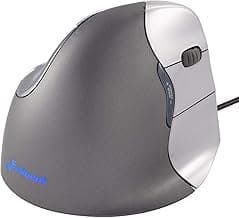
3. Evoluent VerticalMouse 4 — Best Button Customization (83/100)
Fit: 31/35 | Comfort: 22/25 | Control: 15/20 | Value: 15/20
Evoluent pioneered the vertical mouse category and the VerticalMouse 4 reflects that experience. It has six programmable buttons — more than any other vertical mouse at this price — with generous spacing that prevents accidental clicks.
Mac compatibility note: Evoluent offers a dedicated Mac version of the VerticalMouse 4 with a Mac-compatible driver. The Windows version works on macOS for basic functions but loses button programming. Make sure you purchase the Mac-labeled model.
Tradeoffs:
✅ Six programmable buttons — the most of any vertical mouse
✅ DPI indicator LED built into the mouse body
✅ Dedicated Mac model with macOS driver support
✅ Larger body suits hands 18.5–21 cm
⚠️ Mac software is functional but less polished than Logi Options+
⚠️ Bluetooth version is newer and slightly less proven than the wired model
⚠️ Build quality feels a step below Logitech's premium fit and finish
Best for: Mac users who rely on mouse button shortcuts for productivity — CAD, video editing, spreadsheet work. The extra programmable buttons save real time if you currently use keyboard shortcuts that interrupt your flow. See our quiet click guide (https://verticalmouseguide.com/best-quiet-click-vertical-mouse/) if office noise matters.
4. Anker Ergonomic Vertical Mouse — Best Budget Mac Option (76/100)
Fit: 27/35 | Comfort: 20/25 | Control: 14/20 | Value: 15/20
The Anker is the go-to budget recommendation for anyone testing the vertical mouse concept. At under $25, it is a low-risk trial. The catch for Mac users: it uses a 2.4 GHz USB-A receiver with no Bluetooth option. On modern MacBooks, you will need a USB-A to USB-C adapter or hub.
Tradeoffs:
✅ Lowest-risk entry point at under $25
✅ Plug-and-play — no software needed, works on macOS immediately
✅ Solid battery life on a single AA battery (3+ months typical)
⚠️ USB-A receiver only — requires dongle on all modern Macs
⚠️ No companion app — cannot remap buttons or adjust DPI on macOS
⚠️ 1600 DPI max — struggles on Retina displays and multi-monitor setups
⚠️ Smaller body — uncomfortable for hands over 20 cm
Best for: Mac users who want to try a vertical mouse for under $25 before committing to the MX Vertical or Lift. Accept the dongle inconvenience as a trial cost. If the ergonomic position works for you, upgrade within 3–6 months.
5. iClever Ergonomic Mouse — Best Budget Bluetooth (74/100)
Fit: 26/35 | Comfort: 20/25 | Control: 13/20 | Value: 15/20
The iClever's main advantage over the Anker is dual-mode connectivity — Bluetooth and 2.4 GHz. For Mac users, this means native Bluetooth pairing without a dongle. At roughly the same price as the Anker, the Bluetooth support alone makes it the better budget pick for Mac-primary setups.
Tradeoffs:
✅ Bluetooth support — no dongle needed on Mac
✅ Dual-mode: Bluetooth + 2.4 GHz receiver for flexibility
✅ Similar price point to the Anker
⚠️ No macOS companion app — button remapping unavailable
⚠️ Build quality is adequate but noticeably plastic
⚠️ Bluetooth connection can occasionally lag on wake-from-sleep
⚠️ Limited DPI range (1000/1600/2400)
Best for: Budget-conscious Mac users who want Bluetooth connectivity without the premium price. A better Mac-specific budget pick than the Anker if dongle-free operation matters to you.
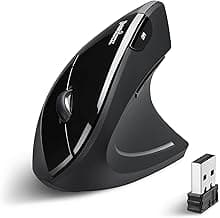
6. Perixx PERIMICE-713 — Budget Wireless (71/100)
Fit: 26/35 | Comfort: 19/25 | Control: 12/20 | Value: 14/20
The PERIMICE-713 is a mid-range wireless option that falls awkwardly between the Anker's value and the Logitech Lift's quality. For Mac users specifically, the lack of Bluetooth and no macOS software make it a weaker pick than the alternatives.
Tradeoffs:
✅ Slightly larger body than the Anker — marginally better for medium hands
✅ On/off switch for battery conservation
✅ Adjustable DPI via button (800/1200/1600)
⚠️ USB-A receiver only — dongle required on Mac
⚠️ No macOS software support
⚠️ Build quality is the weakest on this list
⚠️ Limited regional availability
Best for: Only recommended if the Anker is unavailable and you need a sub-$35 wired/wireless option. Mac users are generally better served by the iClever (Bluetooth) or saving up for the Lift.
Mac-Specific Setup Tips
Optimizing macOS Settings for a Vertical Mouse
Tracking speed: Go to System Settings → Mouse → Tracking Speed. Vertical mice feel different from trackpads — start at a medium setting and adjust over your first week. Do not set it too high during the adaptation period.
Natural scrolling: System Settings → Mouse → Natural Scrolling. Most vertical mice respect this setting. If scrolling feels reversed, toggle this setting rather than looking for a mouse-specific fix.
Button remapping without vendor software: If your vertical mouse has no macOS app, third-party tools like BetterMouse (available at better-mouse.com) or SteerMouse (available via the Mac App Store) can remap buttons and adjust DPI curves on macOS. Both support most USB and Bluetooth mice and offer per-app configuration profiles similar to Logi Options+.
Mission Control gestures: The MX Vertical and Lift can map side buttons to Mission Control, Launchpad, and desktop switching through Logi Options+. This replicates trackpad gestures with mouse buttons — a significant productivity boost for Mac users who rely on gesture navigation.
Bluetooth Pairing Tips
Pair through System Settings → Bluetooth, not through the mouse's 2.4 GHz receiver
If pairing fails, remove the device from Bluetooth preferences and re-pair from scratch
Bluetooth mice may take 1–2 seconds to reconnect after Mac sleep — this is normal and not a defect
For zero-latency needs (rare for productivity work), use the 2.4 GHz receiver instead
Who Should Switch to a Vertical Mouse on Mac
The MacBook Professional
You work 6+ hours daily on a MacBook, often with an external display. Your hand alternates between the trackpad and a mouse. Wrist fatigue accumulates by afternoon. Best pick: Logitech MX Vertical. Bluetooth pairs instantly, Logi Options+ gives you per-app button mapping, and multi-device switching handles the MacBook-to-display workflow.
The Budget-Conscious Mac User
You want to test whether a vertical mouse helps your wrist discomfort, but you are not ready to spend $100. Best pick: iClever Ergonomic Mouse (~$26). Bluetooth means no dongle hassle, and the price is low enough that it is a no-regret purchase even if vertical mice are not for you.
The Left-Handed Mac User
Your options are extremely limited. Most vertical mice are right-hand only. Best pick: Logitech Lift (Left). It is the only premium vertical mouse with a dedicated left-hand model, full macOS software support, and Bluetooth connectivity. See our left-handed vertical mouse guide (https://verticalmouseguide.com/best-left-handed-vertical-mouse/) for the full breakdown.
The Creative Professional
You use Final Cut Pro, Logic Pro, or design tools where extra mouse buttons save time. Best pick: Evoluent VerticalMouse 4 (Mac model). Six programmable buttons give you shortcut access without reaching for the keyboard. Make sure you buy the Mac-specific model for full driver support.
Frequently Asked Questions
Do vertical mice work with macOS?
Yes. All mice listed in this guide work with macOS out of the box for basic functions (cursor movement, clicking, scrolling). For advanced features like button remapping and DPI adjustment, you need either a mouse with a native macOS companion app (Logitech MX Vertical, Logitech Lift, Evoluent Mac model) or a third-party tool like BetterMouse or SteerMouse.
Is the Logitech MX Vertical compatible with MacBook Air and MacBook Pro?
Yes. The MX Vertical connects via Bluetooth to any Mac running macOS 10.15 (Catalina) or later. It also includes a USB-A Unifying Receiver, which works with a USB-C adapter. Logi Options+ is a native macOS application with full feature support on both Apple Silicon and Intel Macs.
Can I use a vertical mouse with an iPad?
Some vertical mice work with iPadOS via Bluetooth — the Logitech MX Vertical and Lift both pair with iPad. iPadOS supports mouse input with a circular cursor and customizable button mapping in Settings → Accessibility → Pointer Control. Not all vertical mice are iPad-compatible; confirm Bluetooth support before purchasing.
Will a vertical mouse help with wrist pain from using a MacBook trackpad?
A vertical mouse addresses forearm pronation — the palm-down position that can contribute to wrist strain. MacBook trackpads require a palm-down posture with additional finger extension. Switching to a vertical mouse changes the wrist angle and the input method, potentially reducing two sources of strain simultaneously. However, wrist pain should be evaluated by a healthcare professional — a mouse alone is not a treatment.
What DPI do I need for a Mac Retina display?
For a single Retina display (MacBook Pro, iMac), 1600 DPI is the practical minimum. For dual-monitor setups or a MacBook connected to an external 4K/5K display, 2400+ DPI provides noticeably smoother cursor travel across the extra screen real estate. The MX Vertical at 4000 DPI handles even triple-display Mac setups comfortably.
Do I need a dongle for a vertical mouse on Mac?
Not if you choose a Bluetooth-capable model. The Logitech MX Vertical, Logitech Lift, and iClever all support Bluetooth, pairing directly with your Mac without a dongle. Budget mice like the Anker and Perixx use 2.4 GHz USB-A receivers, which require a USB-A to USB-C adapter on modern MacBooks and iMacs.
Can I remap vertical mouse buttons on macOS without vendor software?
Yes. Third-party utilities like BetterMouse and SteerMouse can remap buttons system-wide on macOS, including for mice without native vendor apps. Both tools support per-application profiles, custom scroll acceleration, and DPI adjustments. Logitech mice are best served by the free Logi Options+ app, which provides the deepest integration with macOS gestures and multi-device features.
Sources & Methodology
This guide uses the Vertical Mouse Guide 100-point scoring methodology (Fit 35%, Comfort 25%, Control 20%, Value 20%). For this Mac-specific edition, Control scoring includes macOS software quality, Bluetooth reliability, and Retina display compatibility.
References:
OSHA Ergonomic Solutions: Computer Workstations — osha.gov/computer-workstations (https://www.osha.gov/computer-workstations)
NIOSH: Ergonomic Guidelines for Manual Material Handling — cdc.gov/niosh (https://www.cdc.gov/niosh/)
Mayo Clinic: Repetitive Strain Injury — mayoclinic.org (https://www.mayoclinic.org/)
Apple Support: Use a mouse with Mac — support.apple.com (https://support.apple.com/)
Logitech Options+ for macOS — logitech.com/software/options-plus (https://www.logitech.com/software/options-plus.html)
Prices are approximate and reflect typical retail pricing at time of publication. We link to Amazon search results rather than specific product pages to ensure links remain functional as listings change. Vertical Mouse Guide may earn a commission on purchases made through these links at no additional cost to you.
All recommendations are based on our published scoring criteria. Affiliate relationships do not influence scores or rankings. Products that score poorly are published with their low scores intact.
Key takeaway: pick the smallest mouse that still supports your palm, then prioritize low click force.
Mac guide image gallery


Top Picks Quick Comparison
Fast shortlist for decision-first readers. Full table remains below for complete detail.
| Product | Best For | Price | Rating |
|---|---|---|---|
| Logitech MX Vertical | Best overall for Mac | $$$ | 4.7/5 |
| Logitech Lift | Best for small-to-medium hands | $$ | 4.6/5 |
| Evoluent VerticalMouse 4 | Best button customization | $$$ | 4.4/5 |
| Anker Ergonomic Vertical | Best budget starter | $ | 4.3/5 |
| iClever Ergonomic | Best budget Bluetooth | $ | 4.2/5 |
Real Product Photos: All Reviewed Models
Each image below is a real product listing photo stored locally for faster loads and stable rendering.

Comparison Table: Best Vertical Mouse for Mac (2026)
Key takeaway: comfort fit beats raw specs for long-term productivity.
| Product | Best For | Price Band | Rating | Link |
|---|---|---|---|---|
| Logitech MX Vertical | Best overall for Mac | $$$ | 4.7/5 | Check on Amazon |
| Logitech Lift | Best for small-to-medium hands | $$ | 4.6/5 | Check on Amazon |
| Evoluent VerticalMouse 4 | Best button customization | $$$ | 4.4/5 | Check on Amazon |
| Anker Ergonomic Vertical | Best budget starter | $ | 4.3/5 | Check on Amazon |
| iClever Ergonomic | Best budget Bluetooth | $ | 4.2/5 | Check on Amazon |
| Perixx PERIMICE-713 | Budget wireless alternative | $ | 4.1/5 | Check on Amazon |
Note: Amazon links may be affiliate links and can generate commissions at no extra cost to you.