Vertical Mouse vs Regular Mouse: Should You Switch?
A direct comparison of forearm posture, adaptation curve, and use-case tradeoffs between vertical and regular mice.
Updated 2026-03-06
Quick Answer: Vertical Mouse vs Regular Mouse: Should You Switch?
You have probably seen vertical mice on desks, in YouTube ergonomic setups, and recommended by physiotherapists. They look strange, cost more than a standard mouse, and people who use them swear they will never go back. But is a vertical mouse actually better than a regular mouse, or is this just an ergonomic trend? The answer depends on what you do, how long you do it, and whether you are experiencing discomfort.
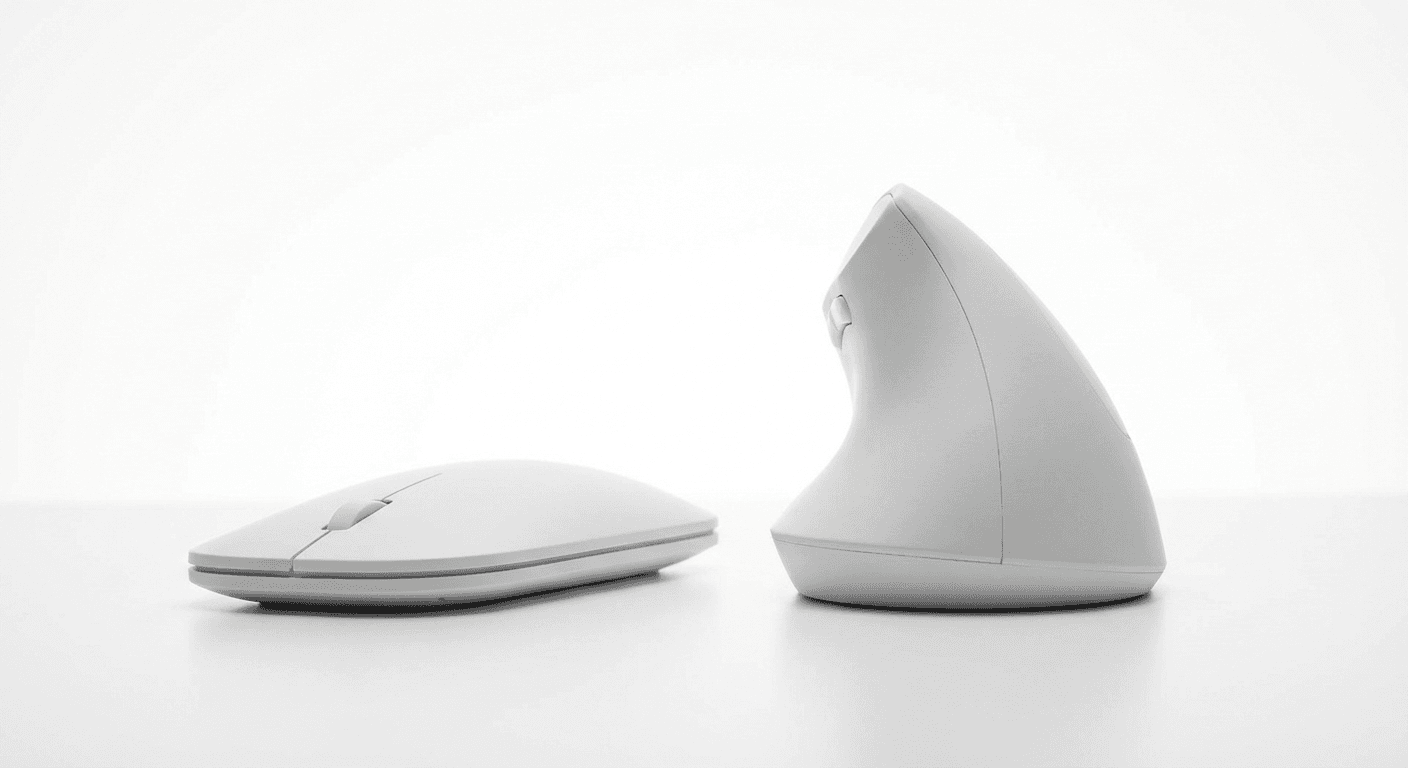
The single most important difference between a vertical mouse and a regular mouse is forearm rotation. A regular mouse positions your palm face-down, which requires your radius and ulna to cross over each other. Sustained pronation increases tension in the forearm extensor muscles and compresses the carpal tunnel area. A vertical mouse positions your palm inward at a 50 to 70 degree angle, keeping your forearm bones parallel and reducing muscle tension.
This is not marketing. Research published in ergonomic and occupational health journals has demonstrated reduced forearm muscle activity when using vertically oriented mice. NIOSH identifies sustained awkward postures, including forearm pronation, as a risk factor for work-related musculoskeletal disorders.
In a detailed comparison, regular mice offer excellent precision with decades of refinement, enormous design variety, and no learning curve. Vertical mice offer a neutral handshake-angle hand position with lower forearm muscle engagement but require a 2 to 4 week adaptation period. Regular mice have options at every price point from 5 to over 200 dollars, while vertical mice range from 15 to over 100 dollars.
You should seriously consider a vertical mouse if you use a mouse for 4 or more hours daily. The ergonomic benefits compound with time. If you spend most of your workday clicking, dragging, and scrolling, the cumulative reduction in forearm strain becomes meaningful.
If you are experiencing wrist or forearm discomfort such as aching, stiffness, or fatigue during or after mouse use, pronation is a likely contributing factor. A vertical mouse directly addresses this. If an occupational therapist or doctor has recommended ergonomic changes, a vertical mouse is one of the most impactful single-device switches, typically more effective than a wrist rest.
If you are setting up a new workstation proactively, a vertical mouse is a low-cost preventive measure. The adaptation curve is easier to absorb when you are already adjusting to a new setup.
Competitive gamers should stay with a regular mouse. Competitive FPS and action games demand the highest precision, polling rates, and grip customization. The best gaming mice offer 8000 Hz polling, sub-30g weights, and grip shapes refined over decades. Graphic designers doing precise freehand cursor work may also find the adaptation period especially disruptive and should consider a pen tablet instead.
People with no discomfort and short daily use of under 2 hours are unlikely to see noticeable benefits from a vertical mouse. Your existing setup is probably fine.
The adaptation process is honest and predictable. Days one through three bring disorientation. Your hand will want to flatten, clicking feels unnatural, and you will overshoot targets. During week one, basic tasks start to feel normal but precision tasks remain noticeably slower. Many people keep their old mouse plugged in for these tasks.
Weeks two to three are the turning point where most users either commit or give up. Speed and accuracy return to roughly 80 to 90 percent of previous levels. Ergonomic benefits become clearer as you notice less fatigue during long sessions. By week four, most users match or exceed their previous speed. Many find that picking up a regular mouse now feels uncomfortable.
Do not evaluate a vertical mouse based on the first week. The learning curve is real but temporary. Ergonomic benefits are permanent. Give it three full weeks minimum.
Vertical mouse pros: reduces forearm pronation, promotes neutral wrist position aligned with OSHA guidelines, familiar movement pattern with a shorter learning curve than trackballs, available at multiple price points including budget options under 25 dollars, wireless options with strong battery life, and can both reduce existing discomfort and prevent future strain.
Vertical mouse cons: sizing is critical and a poorly sized mouse can cause new problems, there is a 2 to 4 week adaptation period with reduced productivity, they are not suitable for competitive gaming, left-hand options are very limited, the minimum price is higher than basic regular mice, and arm and wrist sweeping motion across the desk is still required.
Regular mouse pros: no learning curve, massive variety of shapes and sizes, best-in-class precision for gaming and design, abundant left-hand and ambidextrous options, and available at every price point. Cons: forces forearm pronation, contributes to forearm extensor muscle fatigue, and most so-called ergonomic regular mice still position the hand palm-down.
Common myth: vertical mice are less accurate than regular mice. After the adaptation period, vertical mice with modern sensors at 1600 or more DPI match regular mice for all standard productivity tasks. Another myth: you need an expensive one. The Anker at under 25 dollars provides genuine ergonomic benefit because the core advantage is the vertical shape, not the price tag.
Vertical mice do not prevent, treat, or cure carpal tunnel syndrome. They reduce one risk factor, pronation, associated with carpal tunnel compression. If you suspect carpal tunnel, see a healthcare professional. Also, not having wrist pain does not mean you cannot benefit. Repetitive strain develops gradually, and using a vertical mouse proactively before symptoms appear is a reasonable preventive measure for heavy mouse users.
To choose your first vertical mouse: measure your hand to determine which size guide to follow, set a budget between budget at 15 to 30 dollars and premium at 60 to 100 dollars, decide wireless versus wired with wireless generally preferred for reduced desk drag, read the guide for your hand size, and commit to 3 weeks of use while keeping your old mouse accessible.
For sustained daily use of 4 or more hours, a vertical mouse is measurably better for reducing forearm extensor muscle activity compared to pronated positions. A vertical mouse pairs via Bluetooth or USB receiver with any laptop and is particularly beneficial for laptop users because trackpads force even more extreme wrist positions. Many remote workers carry a compact vertical mouse for this reason.
After the adaptation period, most users match or exceed their previous speed. The only sustained limitation is in competitive gaming where the grip angle affects high-speed flick accuracy. Your brain can also handle switching between both types. Many people use a vertical mouse at work and a regular mouse for home gaming without difficulty.
Programming involves heavy mouse use for code navigation, UI testing, documentation browsing, and tool switching. The movement patterns are identical to general productivity work, making vertical mice a strong choice for developers. Many software developers adopt vertical mice specifically because of their long daily computer hours.
A vertical mouse is measurably better than a regular mouse for one specific thing: reducing the forearm pronation that causes wrist strain during sustained use. A regular mouse is better for competitive gaming, offers far more design variety, and requires zero adaptation.
The practical move for most heavy computer users: switch your primary work mouse to a vertical mouse, keep a regular mouse for gaming or specific precision tasks, and give yourself three honest weeks to adapt. The worst case is you spent 25 dollars and learned something about your ergonomic preferences. The best case is you eliminate a source of daily strain that would have compounded for years.
Key takeaway: pick the smallest mouse that still supports your palm, then prioritize low click force.
Real Product Photos: All Reviewed Models
Each image below is a real product listing photo stored locally for faster loads and stable rendering.

Comparison Table: Vertical Mouse vs Regular Mouse: Should You Switch?
Key takeaway: comfort fit beats raw specs for long-term productivity.
| Product | Best For | Price Band | Rating | Link |
|---|---|---|---|---|
| Anker Ergonomic Vertical | Budget entry to vertical posture | $ | 4.3/5 | Check on Amazon |
| Logitech Lift | Best all-round transition pick | $$ | 4.6/5 | Check on Amazon |
| Logitech MX Vertical | Premium large-hand option | $$$ | 4.5/5 | Check on Amazon |
| Standard Ergonomic Mouse | Conservative non-vertical option | $$ | 4.1/5 | Check on Amazon |
Note: Amazon links may be affiliate links and can generate commissions at no extra cost to you.